
No DNS Terraform Cloud clone
A Terraform Cloud clone without any DNS record requirements
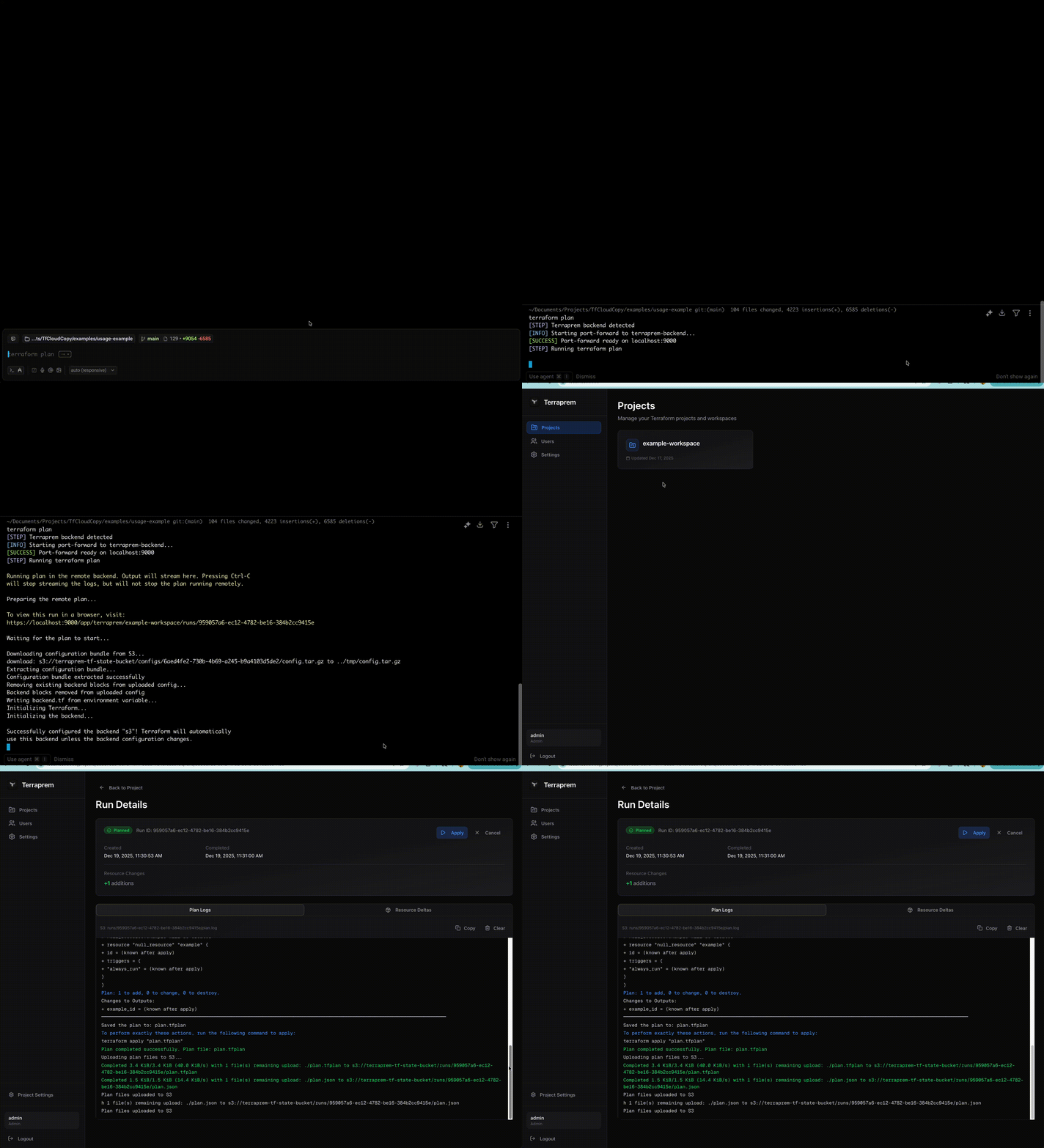
I love the idea of Terraform Cloud. A single place to centralize running all your terraform code? Keep all credentials secure? Consistent runner environment? Sign me up!
But the reality of my experience is that it's slow, expensive and in my very subjective opinion, not worth the cost. With features like a dynamoDB table to handle state locking, and S3 backend - truly that is almost 70% of what you need. Centralized credential store + runner makes things nicer, but is not strictly necessary, especially in smaller teams.
I was setting up a TF cloud org for a client when it hit me - I'll just make my own, better TF cloud.

Note: I am aware of projects like Terrakube, and in reality you should probably use them. I specifically wanted to challenge myself to build a TF cloud clone - without needing any DNS records or public IP addresses.
What exactly do we want to build?
Let's define what we're trying to build. Terraform cloud at its core is simple, run a script on cloud:
- Needs to be easy to use - ideally this should be a drop in replacement for the terraform cloud syntax, or as close as possible to it:
terraform {
    cloud {
        organization = "some_org"
        workspaces {
            name = "some_workspace"
        }
    }
}
-
This should be essentially free to self host. We're not reinventing the wheel here, at rest we should really eat almost no compute costs. Part of this means that runners should be ephemeral and separate from the main process (e.g. isolated individually spun up containers).
-
No public domain should be needed - I don't trust myself with authentication, so we should be able to self host this internally, and use
kubectl port-forwardto access the API locally. -
No reinventing the wheel - core important functionality like state management, workspace locking, should use functionality that already exists (e.g. DynamoDB + S3).
-
I want to recreate parts of the UI from TF cloud. I'd ideally be able to manage users, variables, secrets, etc. from a single place.
High Level Architecture
Given those requirements, I came up with the following high level architecture:
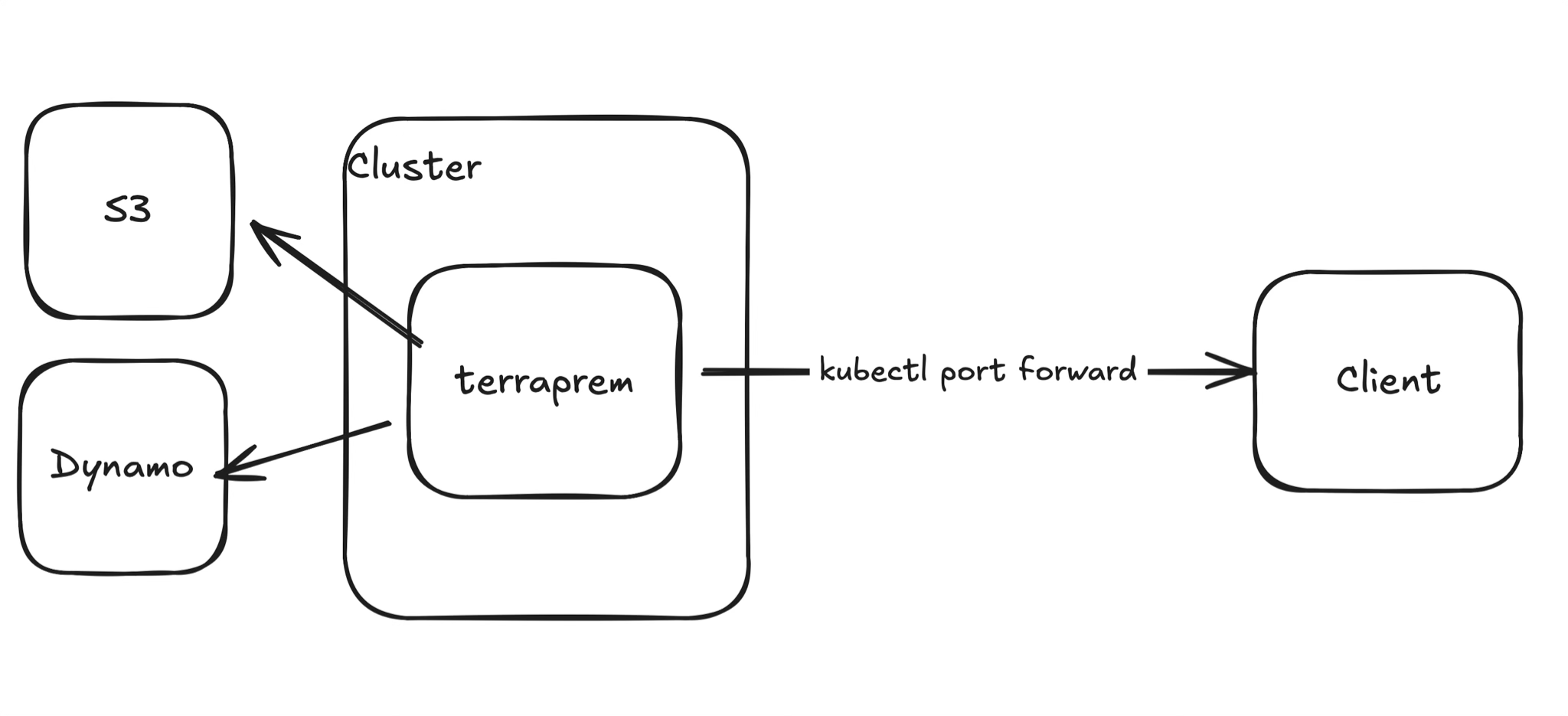
We'll use a Kubernetes cluster to host our main process, that will then connect to S3 and DynamoDB for state management + workspace locking respectively. We'll then use port forwarding to access the API locally.
Diving into the main process a bit:
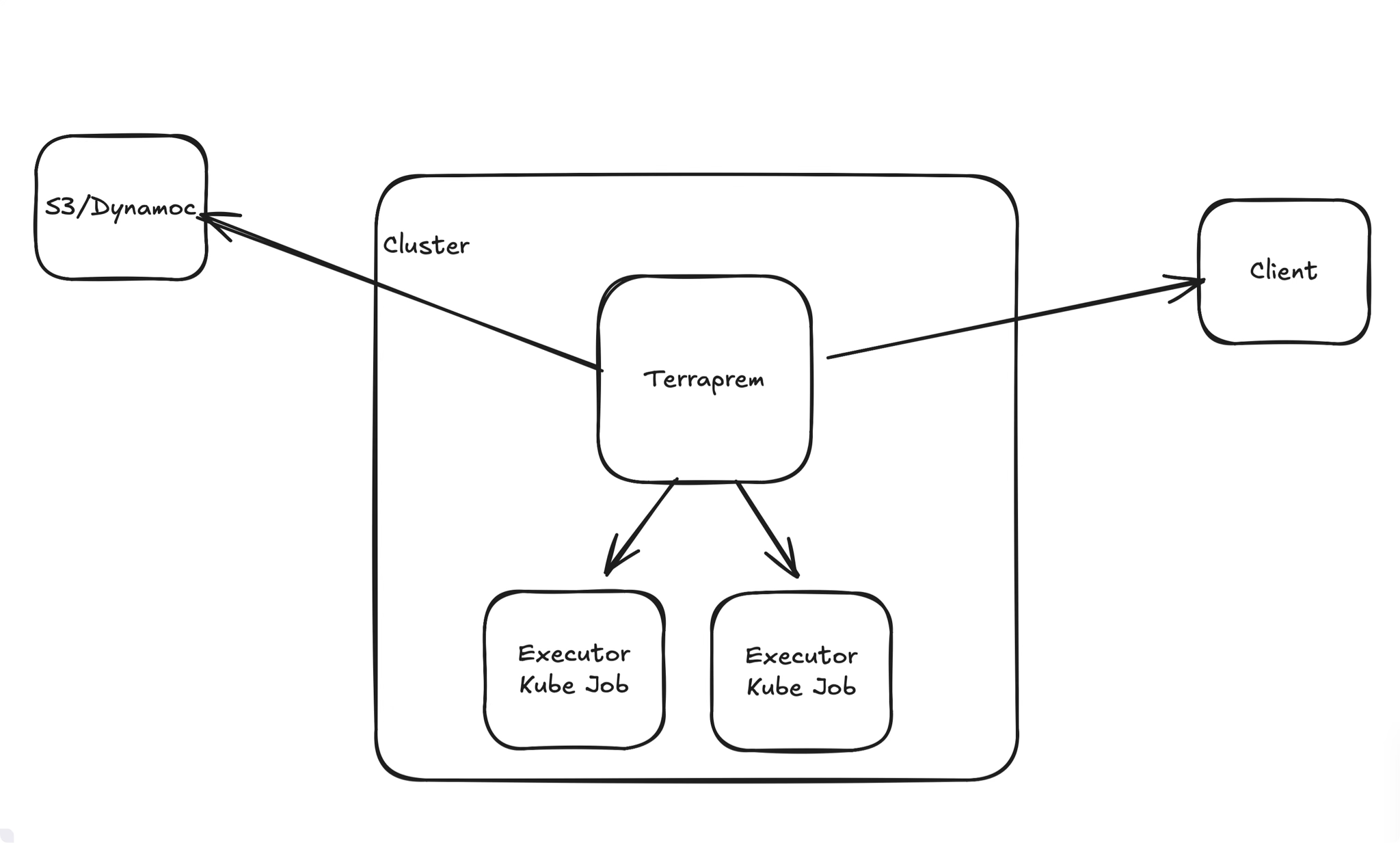
We'll then use Kubernetes jobs to spin up isolated runners for each terraform command (e.g. init, plan, apply, etc).
A few more details
Building out the core functionality was relatively straightforward, I'll let the reader read the source code if they're interested. A few other implementation details that were interesting:
-
Where do you store the logs?
One thing I wanted to maintain from TF Cloud was the ability to view logs for historical runs. I've noticed that not only is this a good audit trail, but also can serve as a way to debug if things have drifted (and when they did).
Logs can get large very quickly, especially for terraform modules that have lots of resources. So I ended up saving the logs to S3, then querying them to display on the UI.
This should scale as logs grow, and even can implement automated cleanup of old logs (either moving them to glacier, or just deleting them).
-
How do you manage secrets?
I'm not going to invest my own encryption here, so I ended up implementing a generic secret manager - and then implementing AWS Secret Manager as the engine. For now, all variables, secrets, envvars etc will be stored here. In the future, it would make sense to separate sensitive vs non-sensitive secrets in order to save on costs querying the secret manager.
-
Variable Sets
One thing that I thought I could punt would be the idea of variable sets (e.g. a group of secrets/variables that I want to re-use across multiple workspaces). I quickly realized that a lot of the TF projects I have share common base variables (e.g. AWS region, AWS account ID, etc). I ended up implementing a single variable set that all workspaces can inherit from.
Building
Getting started was easy, but I quickly realized that my one requierment - being able to do everything via port forwarding - was going to conflict with the https requirement that local terraform command requires. I was unable to find any envvar that could get around this:
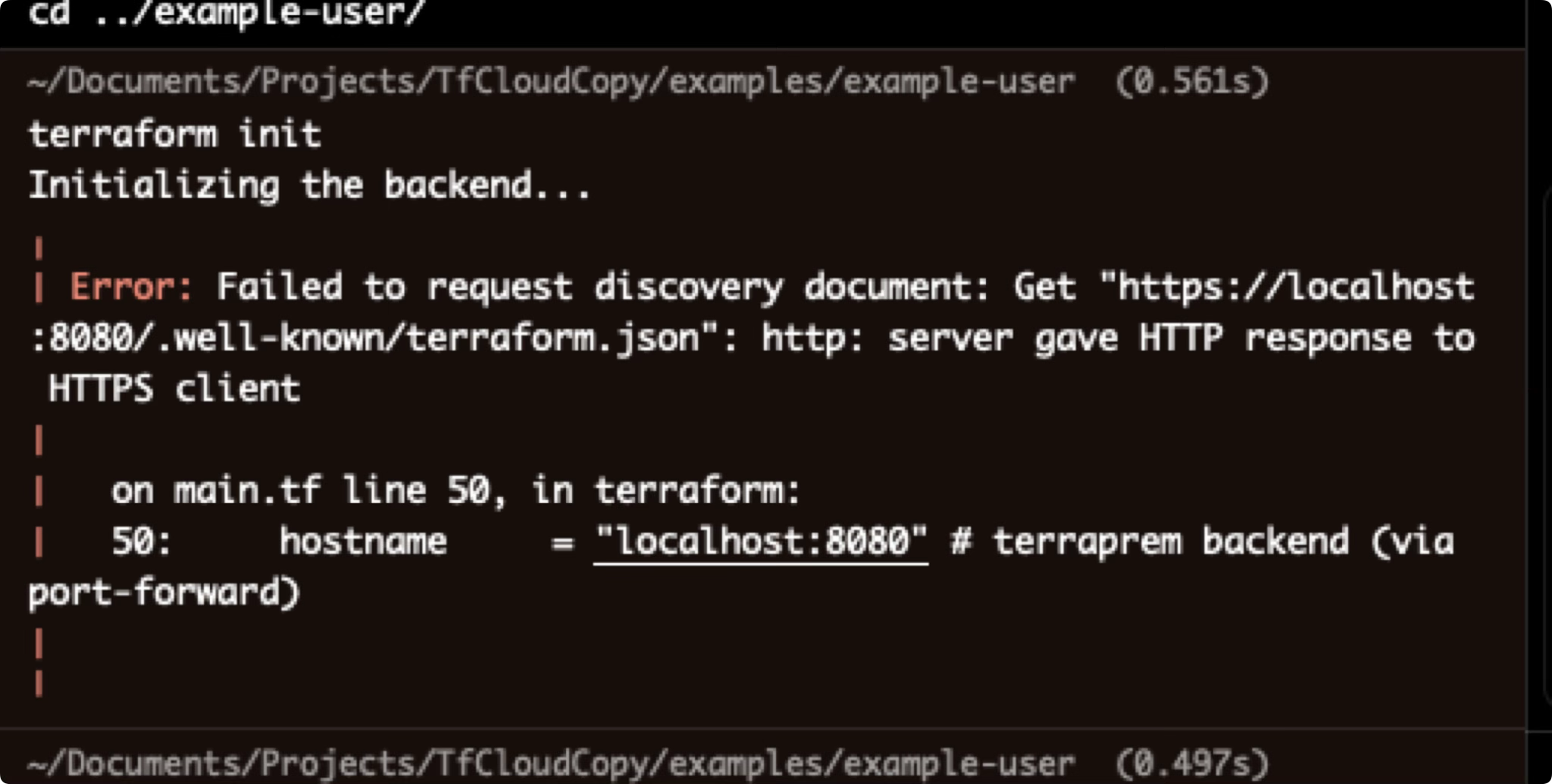
In order to get around this, I ended up having to generate a Kube TLS cert, then loading that in locally. This was a bit of a pain, and definitely adds some friction. But if you were to expose this via a regular DNS with HTTPS termination this would not have been an issue:
/* Generate TLS private key for backend HTTPS */
resource "tls_private_key" "terraprem_tls" {
  algorithm = "RSA"
  rsa_bits  = 2048
}

/* Generate self-signed TLS certificate for backend HTTPS */
resource "tls_self_signed_cert" "terraprem_tls" {
  private_key_pem = tls_private_key.terraprem_tls.private_key_pem

  subject {
    common_name  = "localhost"
    organization = "Terraprem"
  }

  validity_period_hours = 8760 /* 1 year */

  allowed_uses = [
    "key_encipherment",
    "digital_signature",
    "server_auth",
  ]

  dns_names = ["localhost"]
  ip_addresses = [
    "127.0.0.1",
    "::1",
  ]
}

/* Kubernetes TLS secret for backend HTTPS */
resource "kubernetes_secret" "terraprem_tls" {
  metadata {
    name      = "terraprem-tls"
    namespace = kubernetes_namespace.terraprem.metadata[0].name
    labels = {
      app = "terraprem"
    }
  }

  type = "kubernetes.io/tls"

  data = {
    "tls.crt" = base64encode(tls_self_signed_cert.terraprem_tls.cert_pem)
    "tls.key" = base64encode(tls_private_key.terraprem_tls.private_key_pem)
  }
}
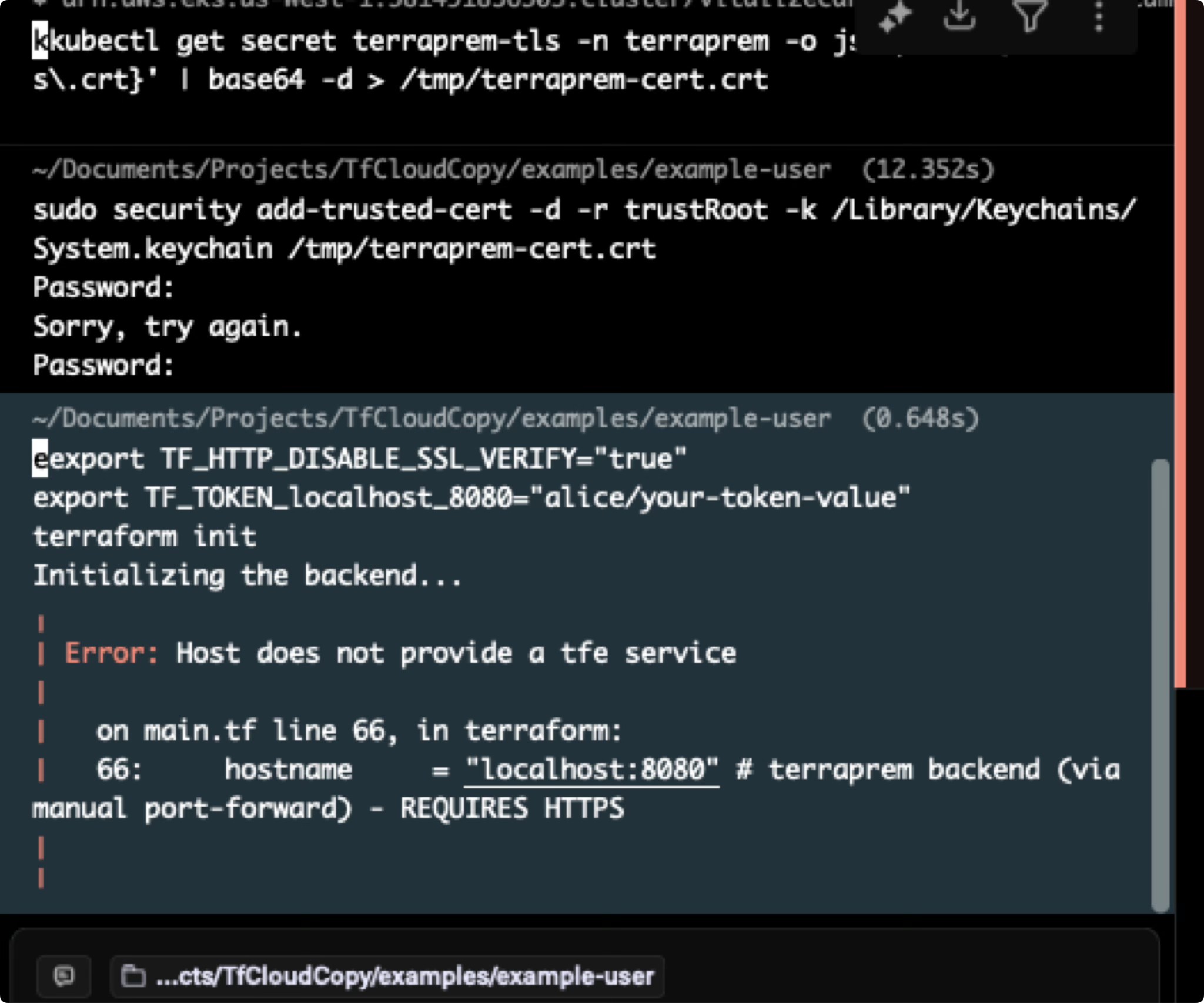
But that lead to yet another issue - reverse engineering the terraform CLI API 😭. Part of my spec was to be a drop in replacement for the terraform cloud syntax, so I needed to be able to call the terraform CLI API in the exact same way as terraform cloud. My backend needs to be smart enough to trick the CLI into think it's talking to TF cloud.
I'll admit, a lot of this was pulling from the terraform source code, and then passing that into Claude to reverse engineer. But after some trial and error, I was making progress:
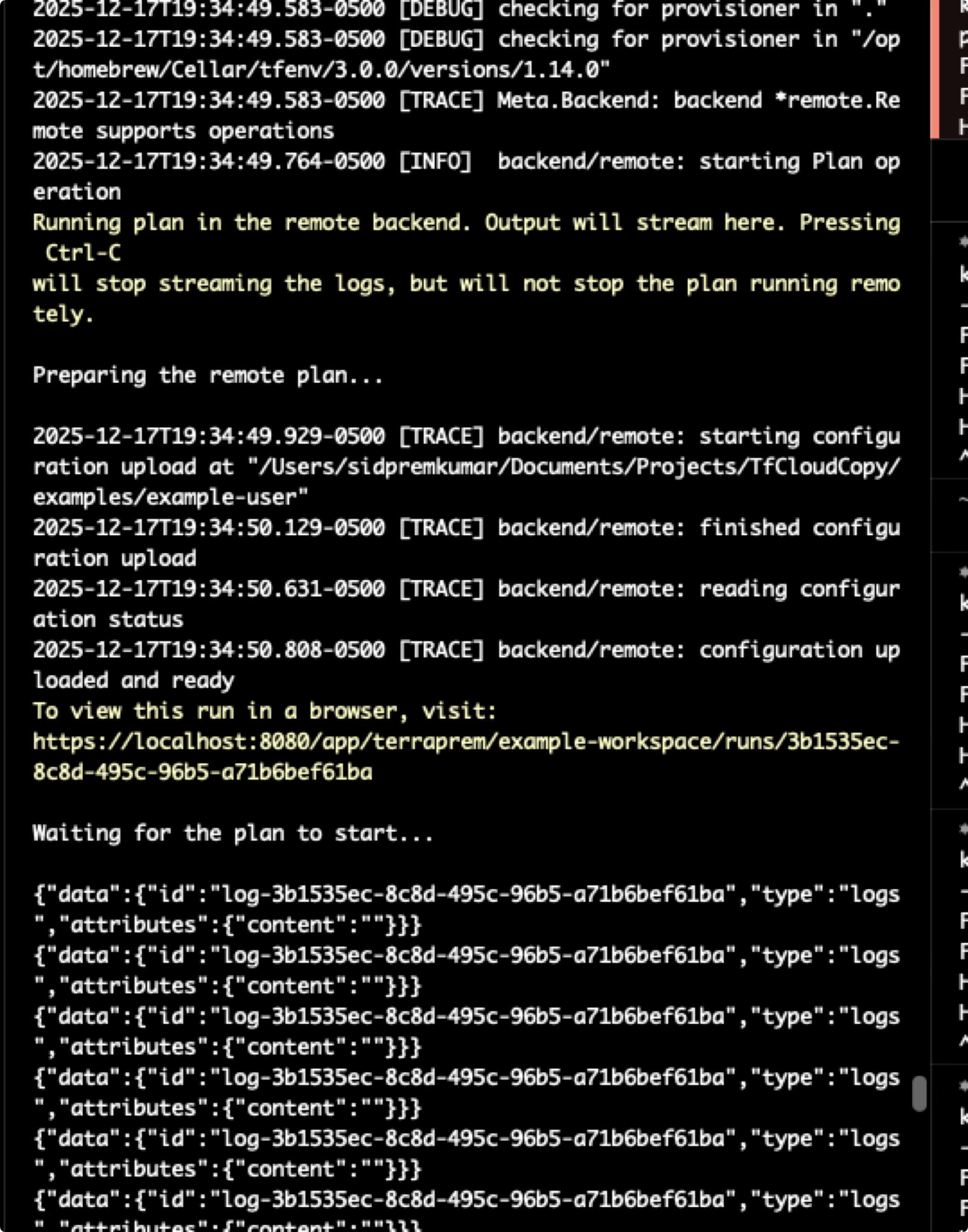
The next issue I ran into was dynamically refactoring the backend state. The core problem is, on the client side, we define backend state as we would for TF cloud, like:
terraform {
  backend "remote" {
    hostname     = "localhost:8080"
    organization = "terraprem"

    workspaces {
      name = "example-workspace"
    }
  }
}
But, as I said, S3 backend + DynamoDB is the move, I don't want to get in the business of state management. To get around this - went with the naive approach of just using awk to replace the remote backend with the s3 backend. Very hacky - but it works:
Downloading configuration bundle from S3...
Extracting configuration bundle...
Configuration bundle extracted successfully
Removing existing backend blocks from uploaded config...
And, skipping a few steps, I finally was able to get the CLI to work with my backend!
Make It Better
You could probably end it here. In reality expose the API using regular DNS to avoid the port forwarding nonsense. But there is something about having no public DNS records that makes the security engineer inside me happy.
The biggest hassle is spinning up a background terminal process to run the port forwarding - and a main one to run the terraform command.
window1> kubectl port-forward svc/terraprem-api 8080:8080
window2> terraform init
In a magical world, what I really wanted to do is create a custom backend that would auto-handle the port forwarding within the terraform code itself.
terraform {
  backend "tfcloud" {
    hostname     = "localhost:8080"
    namespace    = "terraprem"
    name         = "terraprem-api"
    local_port   = 8080
    remote_port  = 8080
  }
}
This was unfortunately just not possible. Terraform supports these backends, but looking into extending the source code really was not possible without a lot of re-writing or hacky/janky solutions.
The second best solution was to create a wrapper script that would then be aliased to terraform - and then would handle the port forwarding automatically.
The script would look for the backend block, and read the variables present - start the port forwarding process, hot-swap the code to use a normal tf-cloud backend, run the command, then hot-swap the code back to the port forwarding backend.
This resulted in the final main.tf file containing like:
terraform {
  required_version = ">= 1.0"

  /*
   * Terraprem backend - automatically manages port-forward
   *
   * The wrapper script detects this, starts port-forward, and temporarily
   * rewrites it to backend "remote" for Terraform execution.
   */
  backend "terraprem" {
    namespace   = "terraprem"
    service     = "terraprem-backend"
    remote_port = 8080
    organization = "terraprem"
    token       = "1234567890" # Your token generated from the frontend
    workspaces {
      name = "example-workspace"
    }
  }
}
And running:
> alias terraform='path/to/terraprem/terraform-wrapper.sh' # One time - in the terraprem repo
> terraform apply
There were a few issues that came up:
- Managing the kubectl process was just a pain - anyone that's tried to manage a subprocess I'm sure can relate but trying to keep track of the PID and always killing it after the fact was a hassle.
- I ran into issues where I was using the frontend (via manual
kubectl port-forwardcommand) but also wanted to useterraform apply. And then ports would collide, to get around this I updated my wrapper script to find a random free port. - Credentials are mapped in
~/.terraform.d/credentials.tfrc.json. This is what is saved when you runterraform loginfor example. It ends up looking like:
{
  "credentials": {
    "app.terraform.io": {
      "token": "1234567890"
    },
    "localhost:8080": {
      "token": "1234567890"
    }
  }
}
What I ended up having to do is update the wrapper script to:
- Pull the token from the credentials.tfrc.json file.
- Update the credentials.tfrc.json file with the correct token for the dynamic port.
- Run the terraform command.
- Remove the credentials.tfrc.json file entry
This makes it truly almost a 1:1 drop in replacement for the terraform cloud and allows you to self host without any public DNS records 🚀.
Conclusion
To conclude, this was a fun project to see how far you can get with a bit of reverse engineering and creative solutions around avoiding DNS records. As mentioned at the start, projects like Terrakube are likely a much better fit for most, but if DNS records are a deal breaker, this is a fun way to get around it.
If you're interested in checking out the source code, you can find it here!